Most service businesses run Meta ads and wonder why leads don't convert. The problem isn't the ads. It's what happens — or doesn't happen — after the click. Here's the three-part stack that closes that gap.
Meta Ads + Landing Page + CRM: The Lead Gen Stack That Actually Works
Here's the conversation that happens in almost every service business we work with. The founder is spending $2,000–$5,000 a month on Meta ads. Leads are coming in — some months more, some months less. But the revenue from those leads doesn't match what should be possible at that ad spend. Either the leads seem low quality, or they go cold before anything happens, or nobody can tell which campaigns actually produced paying clients.
The ads get blamed. The agency gets replaced. The budget gets cut or shifted to a different channel. And the same problem reappears.
In most cases, the ads aren't the problem. Meta ads are one of the most cost-effective paid channels available to service businesses right now — median CPL across industries is $27.66, median CTR is 2.19%, and the platform reaches 89% of global marketers (Triple Whale, Feb 2026, dataset of ~35,000 brands). Those aren't bad numbers.
The problem is what happens after the click. The landing page doesn't match the ad's promise. The form submission goes to an inbox instead of a CRM. Nobody follows up within the first hour. The lead that was worth $27.66 to acquire goes cold within 48 hours because there was no system waiting to receive it.
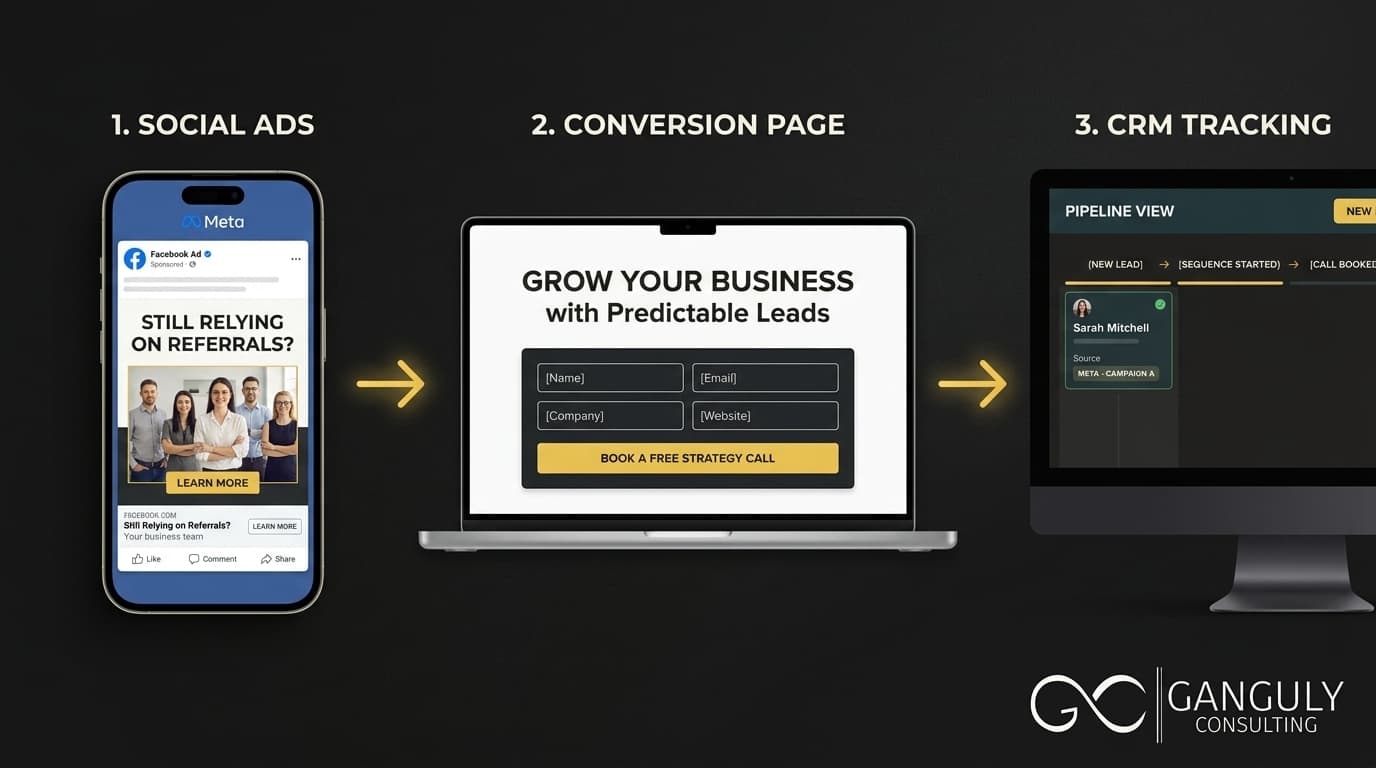
This post covers the three-part stack — Meta ads, landing page, CRM — and what each component needs to do for the whole to work. Not in theory. In practice, for a service business.
Read more: The Complete Guide to Building a Digital Growth System for Service Businesses
Key Takeaways
- Meta ads median CPL is $27.66 across industries in 2025 — the platform works when what follows the click is built correctly (Triple Whale, 2026)
- 63.5% of B2B businesses never respond to inbound leads at all; average response time among those who do is over 1 day (RevenueHero, 2024)
- Leads reached within 5 minutes are 21× more likely to convert than those contacted after 30 minutes (MIT/InsideSales research)
- CRM implementation drives an average 29% increase in sales revenue and $3.10 return per dollar spent (Nucleus Research, 2023)
- Professional services email sequences achieve a 45.96% open rate — nearly double the B2B average (Mailchimp, 2025)
Part 1: The Meta Ad — What It's Actually Supposed to Do
Most service businesses think their Meta ad needs to sell the service. It doesn't. The ad has one job: get the right person to click.
That's it. The ad's function is audience selection and curiosity creation. It should speak precisely enough to a specific problem that the person experiencing that problem self-selects — clicks because the message is about them, about their situation, about the outcome they want. Everyone else scrolls past. That's the goal.
The most common Meta ad mistakes for service businesses:
Too broad a promise. "We help businesses grow" is addressed to everyone and therefore no one. A qualified prospect — a founder of a professional services firm who is spending on ads but not converting leads — doesn't see themselves in a generic growth message. They see themselves in "Why your Meta ads are generating leads that never book a call — and how to fix it in 30 days."
The wrong objective. Meta offers several campaign objectives — awareness, traffic, lead generation, conversions. For service businesses, lead generation (using Meta's native Lead Ads form) or conversions (sending to a dedicated landing page with a form) are the right objectives. Traffic campaigns optimise for clicks, not leads. The CPL difference is significant.
Sending traffic to the homepage. This is the single most expensive mistake in Meta advertising for service businesses. The homepage is built for multiple audiences. A Meta ad is targeting one specific audience with one specific message. Sending that traffic to a page that wasn't built to receive it breaks the message match that made the prospect click in the first place.
What a good Meta ad looks like for a service business:
- Headline: A specific problem statement ("Still relying on referrals for 80% of your revenue?")
- Body copy: 2–3 sentences acknowledging the frustration and introducing the possibility of a different approach
- Creative: An image or video that signals professional credibility — not stock photography of a handshake, but something that feels like it came from someone who understands the business
- CTA: "Learn More" or "Book a Call" — the softer the commitment, the higher the click-through rate at the top of funnel
The ad's job ends when the click happens. What comes next is the landing page's job.
Read more: Why Your Website, Ads, and CRM Need to Work as One System
Part 2: The Landing Page — Where Ads Go to Convert or Die
The landing page is where most service business lead gen stacks fail. The ad gets people to click. The landing page is supposed to get them to act. When it doesn't, the money spent on the ad is wasted.
A landing page built for paid ad traffic has specific requirements that a homepage doesn't meet:
Message match. The headline on the landing page should reflect the same promise that made the visitor click the ad. If the ad says "Build a lead generation system that doesn't depend on referrals," the landing page headline should acknowledge that same problem and promise. Any disconnect between the two is a trust violation — the visitor thinks they've been misled, even if they can't articulate why.
A single CTA. A landing page with multiple CTAs — "book a call," "download a guide," "learn about our services," "contact us" — forces a decision before the visitor is ready to decide. A single CTA removes that friction. The median conversion rate for single-CTA landing pages is 13.5% (Unbounce, 2024).
No navigation. Every link that leaves the landing page is an exit ramp. Landing pages should have no main navigation, no footer links to the blog, no social media icons. The visitor arrived for one reason. Give them one path.
Specific trust signals. Generic testimonials don't convert. A testimonial that names a client type, describes a situation, and cites a specific result does. The visitor needs to see themselves in the social proof — that someone like them had a problem like theirs and got a result worth having.
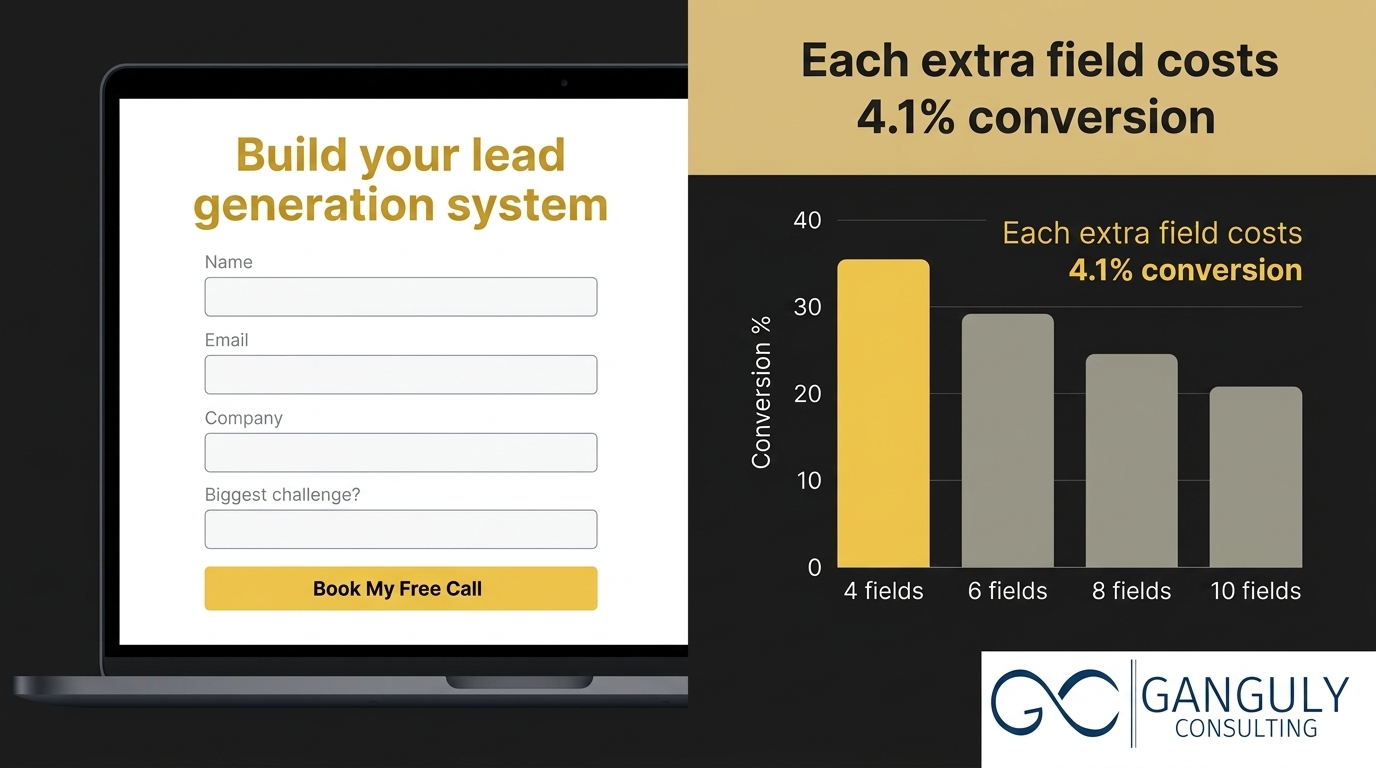
A short, specific form. Each additional form field reduces conversion rate by an average of 4.1% (VentureHarbour, 2024). For a top-of-funnel discovery call offer, four fields are sufficient: name, email, company, and one qualifying question ("What's your biggest challenge with lead generation?"). Anything beyond that belongs in the sales conversation, not the form.
Part 3: The CRM — Where the Lead Either Gets Converted or Goes Cold
A lead that fills out your form isn't a sale. It's a signal of intent. What happens in the next 5–60 minutes determines whether that signal becomes a conversation or becomes a cold contact in a list nobody looks at.
The data on this is stark. RevenueHero's 2024 study submitted inbound demo requests to 1,000 B2B websites and found that 63.5% never responded at all. Among those that did respond, the average response time was 1 day, 5 hours, and 17 minutes (RevenueHero, 2024). MIT's research — validated across multiple subsequent studies — found that leads reached within 5 minutes are 21× more likely to convert than those contacted after 30 minutes.
The first vendor to respond wins 35–50% of sales. Most service businesses aren't winning that race because they're not running it. The follow-up is manual, inconsistent, and slow.
The CRM's job in this stack is to eliminate that variability:
Step 1 — Automatic contact creation with source data. When a visitor fills out the landing page form, a CRM contact is created automatically — name, email, company, their qualifying answer, and the source (which ad, which campaign). No manual data entry. No notification that gets checked two days later.
Step 2 — Automated confirmation within 60 seconds. A confirmation email goes out immediately. It confirms the submission, sets expectations ("You'll hear from us within one business day to schedule your call"), and optionally delivers a piece of immediate value — a relevant article, a short video, or a specific insight related to what they filled out the form about. This email alone differentiates you from the 63.5% who never respond.
Step 3 — Nurture sequence starts. A four-email sequence — Day 0, Day 1, Day 3, Day 5 — runs automatically. Each email adds value, builds credibility, and gently moves the prospect toward booking a call. This runs without anyone doing anything manually.
Step 4 — Pipeline stage tracking. The lead has a status in the CRM: New, Sequence Active, Call Scheduled, Proposal Sent, Closed. You can see at any moment exactly how many leads are at each stage, where they came from, and what happened to the ones who went quiet.
CRM implementation drives an average 29% increase in sales revenue and a $3.10 return for every dollar spent (Nucleus Research, 2023). That return doesn't come from storing contacts. It comes from the automation and visibility that a properly configured CRM provides.
The right CRM for this stack depends on your existing tools and budget. HubSpot (free tier) handles all four steps above. GoHighLevel is purpose-built for service businesses and includes the landing page builder. ActiveCampaign has the deepest email automation. The tool matters less than the configuration — a fully connected free CRM outperforms an expensive one where the automations were never set up.
Read more: Why 65% of Businesses Have No Lead Nurturing Process (And How to Build One)
The Full Stack in Action: What a Week Looks Like
Here's what this stack produces in a typical week for a service business running a $3,000/month Meta campaign:
Monday: 12 leads come in from the weekend's ad run. Each one automatically creates a CRM contact. Each one gets a confirmation email within 60 seconds. Each one enters the nurture sequence.
Tuesday: 4 of the 12 open the Day 1 email. 1 replies with a question. That reply creates a task in the CRM. You respond personally — not to a cold lead, but to a warm prospect who has already received value from your sequence.
Wednesday: The reply conversation continues. The prospect books a call via the Calendly link in your sequence. Their pipeline stage updates to "Call Scheduled" automatically.
Thursday: You have the call. It's productive because the prospect has already read your Day 1 and Day 2 emails and understands your perspective before the conversation starts.
Friday: Of the 12 leads, 1 has booked, 4 are still in sequence, 7 haven't engaged with email yet. All 12 are still in the pipeline. None have been manually moved. None have been forgotten.
Next Monday, 12 more leads come in. The cycle repeats. Over 90 days, the leads from week one are still progressing — some convert in week 3, some in week 8. Your pipeline deepens without increasing ad spend.
That's what the stack actually does. It's not magic. It's a designed system where each piece does its job and the handoffs are deliberate.
Frequently Asked Questions
How much should I spend on Meta ads before I know if it's working?
Run a minimum of $1,500–$2,000/month for at least 60 days before making conclusions about performance. Meta's algorithm needs time (and data — typically 50 conversions per ad set) to optimise delivery. Below that threshold and timeframe, you're making decisions based on noise, not signal. The more important benchmark is your landing page conversion rate: if it's below 5% after 200 clicks, the landing page is the problem — not the ad spend level.
Do I need a separate CRM if I already have one embedded in my website builder?
Depends on whether it supports automations and source tracking. Most embedded "CRMs" in website builders are glorified contact lists — they capture the submission but don't trigger sequences or tag the source. If yours does both, it may be sufficient. If not, connecting your existing form to HubSpot or GoHighLevel via Zapier takes an afternoon and gives you everything you need. Test it: submit your own form and check whether the resulting contact has source data and whether an automated email fires within 60 seconds.
What's the best Meta ad format for a service business?
For top-of-funnel awareness and lead generation, single-image or video ads outperform carousel ads for most service businesses. The key variable isn't the format — it's the specificity of the message. A plain-text image with a specific problem statement often outperforms a polished graphic with generic copy. Test both: run one creative that prioritises message specificity and one that prioritises visual production. Let the data decide.
How do I know which Meta ad campaign generated which client?
UTM parameters on your landing page URL, combined with source tracking in your CRM, give you complete attribution. Every ad's destination URL should include: ?utm_source=facebook&utm_medium=paid&utm_campaign=[campaign-name]&utm_content=[ad-name]. When a lead fills out the form, your CRM captures those parameters and stores them on the contact record. When that lead becomes a client, you can trace back exactly which campaign and ad generated them.
What open rate should I expect from the nurture sequence emails?
Professional services email sequences average 45.96% open rates and 2.41% click rates on Mailchimp's 2025 benchmarks (Mailchimp, 2025) — nearly double the B2B average. Note that Apple's Mail Privacy Protection inflates open rates across all email platforms, so treat open rates as directional rather than absolute. Click rate and reply rate are more reliable engagement signals. For a four-email sequence to a warm lead, a 5–10% reply rate on any individual email indicates strong content-audience fit.
The Stack Isn't Complicated — It's Just Designed
The Meta ads + landing page + CRM stack isn't a sophisticated technology play. It's the basic infrastructure that every service business needs before increasing ad spend makes any sense.
Without a landing page built to receive the traffic, you're paying for attention that has nowhere to go. Without a CRM that auto-creates contacts and fires sequences, you're paying for leads that go cold by default. Without source tracking, you're running campaigns with no feedback loop — no way to know what worked and no way to improve.
With all three connected, the math changes. Every dollar spent on ads produces a lead that enters a managed pipeline. Every lead gets followed up with consistently, regardless of how busy you are. Every campaign produces data that makes the next one better. And over time, the stack doesn't just generate leads — it compounds.
Read more: The 5 Layers of a Digital Growth System Every Service Business Needs
Abhisek Ganguly is the founder of Ganguly Consulting, a premium tech and growth consulting firm that helps service businesses build integrated digital growth systems. Ganguly Consulting works at the intersection of technology, marketing, and business strategy.